
Preparation
Before doing any of the track setup, run /server build to get to the build server, then go to the location you would like to paste your file.
Importing
WorldEdit
⚠️ Warning: The extension of the schematic must be
.schemto work, if the schematic as a.litematicextension see the Axiom method.
Step 1: Get the file you would like to import.
Step 2: Navigate to this website and upload your file there.
Step 3: Copy the command the website gives you and paste it into Minecraft chat.
Step 4: Go to the location you want the schematic to be placed and run //paste -a in Minecraft chat.
Axiom
Step 1: Open the axiom menu.
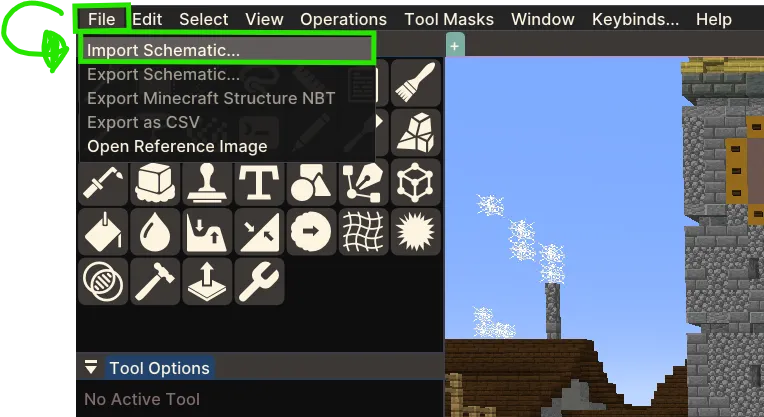
Step 2: In the upper left corner, click on the File button then click on the import schematic… button.
Step 3: Locate your file, this file can be in .litematic or a .schem format, then click on it.
Step 4: Look at the ground then, If your on Windows do Ctrl + V and if your on Mac do Cmd + V.
Exporting
Step 1: Select your area with Worldedit.
Step 2: Run //copy -m !0 in Minecraft chat.
Step 3: Run //download.