
Setting up a track
To create a track, use the track create command. In this guide, /te is used as a shortcut for /trackedit.
/te create <track_name>
When you run this:
- Your current position and rotation become the track spawn
- The item you are holding becomes the TT menu item (or a packed ice if your hand is empty)
Stand at the intended spawn, facing the correct race direction, before you create the track. Getting this wrong is a common beginner mistake. To fix it, you can adjust it with /te spawn.
To edit a track later, select it with /te select <track_name>. Always check the currently selected track, by using /te to avoid making changes to the wrong track.
Creating regions
Tracks are built from region types. A usable track needs at least:
- One start region
- One checkpoint
Mistakes here usually show up as missed checkpoints, false starts/finishes, pit abuse, or fall-offs with no recovery.
Making a selection
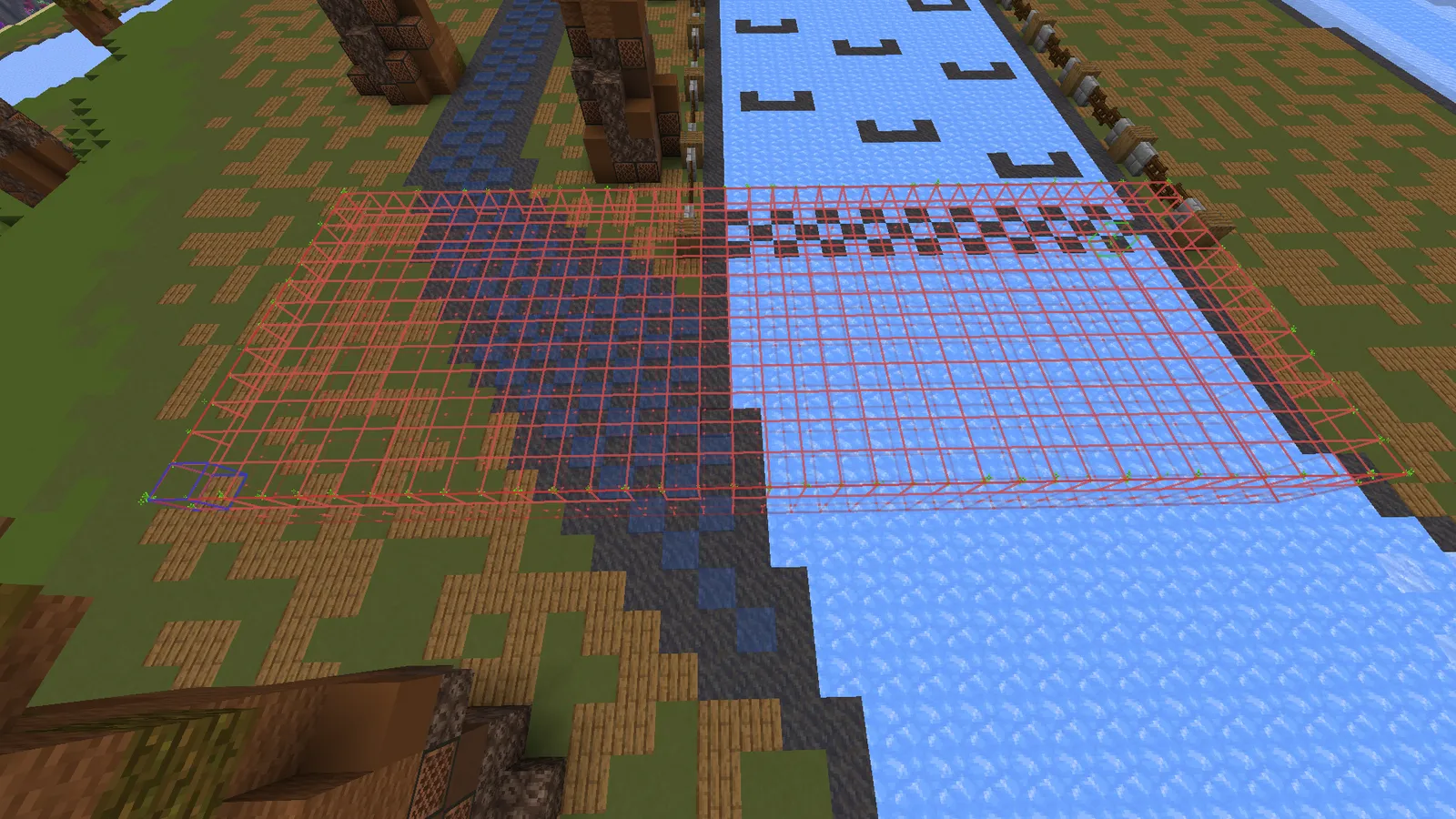
Use WorldEdit to define the region:
- Run
//wand - Left-click one corner, right-click the opposite corner (cuboid)
- Poly selections are also supported
Size guidelines
- Selection should be at least one block into the ground and one block above the surface
- Prefer wide “walls” across the racing line, not thin slabs—small regions can be passed before the server registers entry/exit
- If you use boat step-ups (OpenBoatUtils), make regions several blocks tall into the air
- Start/finish should be especially wide and tall so high-speed entries are reliable
Region geometry vs region spawn
Two different things get saved:
| What | How it is set |
|---|---|
| Region shape | Your WorldEdit selection |
| Region spawn | Your player position/rotation when you run the region command |
⚠️ Warning: When creating any region (especially checkpoints, start, end, and reset), stand off the racing line and on the ground. If a driver is later teleported to that region spawn, they should not spawn mid-track or in the air.
Regions
Regions use an optional <index> argument, allowing multiple regions of the same type.
The index can also be used for changing regions. or when adding a - before the index to remove it (for example, -2 or -all).
Use /te view to enable particles and visualize regions. Use /te regions to list them.
Start Region
Starts the player's timer. If no end region exists, it also finishes the time (typical for loops).
/te region start <index>
Checkpoint Region
Players must pass all checkpoints before finishing. Checkpoints stop skip cuts and feed race time deltas.
/te region checkpoint <index>
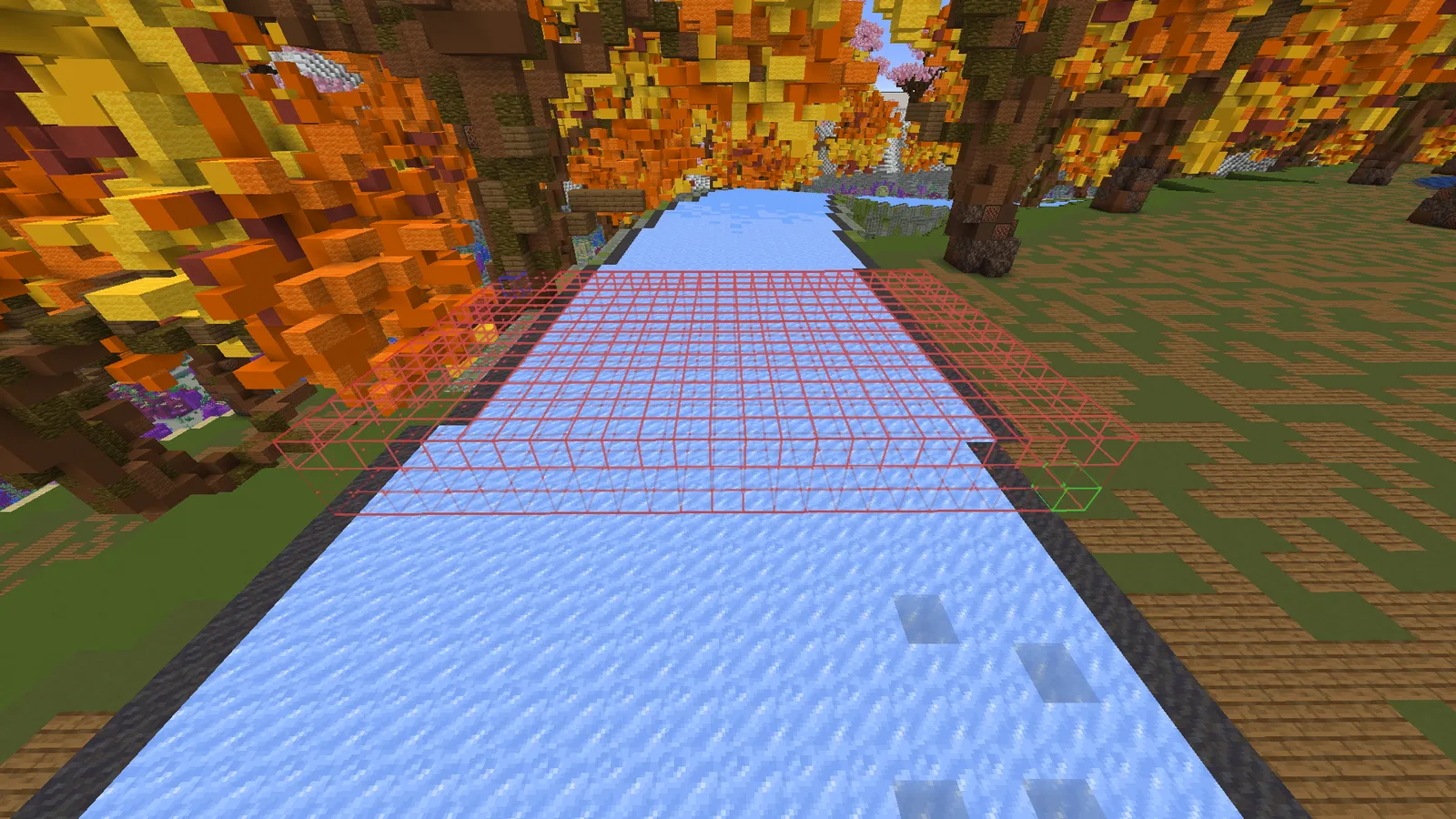
⚠️ Warning: Checkpoints/regions have spawn points that get set to the location of the user when creating the checkpoint. Ensure you're off the racing line and on the ground when creating a region.
End Region
Finishes the player's time on point-to-point / non-loop tracks.
/te region end <index>
⚠️ Warning: If the track is a loop, do not set an end region. The start region acts as the finish so lap timing can close correctly when drivers cross the start again.
Reset Region
Reset Region resets the driver back to the last checkpoint in races otherwise i will be brought back to the track spawn. Commonly used in areas where drivers can fall off the track.
/te region reset <index>
💡 Tip: Reset region can also be used to teleport players. To do that, make sure to enable the track setting
/te option reset_to_reset_spawnand now, whenever the player touches the reset region, they will be teleported to the place you ran the command.
Pit Region
The pit region marks the spot where the player will be granted the pit, so make sure to place it near the end of the pit but before the Exit Pit Region (explained later).
/te region pit <index>
Inpit Region
This is usually a large region. Inpit regions are used to show the "In Pit" text on the scoreboard, so making the region cover the entire pit lane is the right choice. The inpit region also blocks people from resetting to prevent them from getting a faster pit exit than intended.
/te region inpit <index>
Exit Pit Region (optional)
Pit End regions are used to prevent the player from entering the pit from the wrong direction by letting through only the drivers who have passed the Pit region this lap, so as explained before, place this region at the end of the pit.
/te region pit_end <index>
Track locations
Track locations take the current position and rotation. They are visualized with particles when /te view is active.
Use /te locations to list all locations.
Track Spawn
/te spawn
Finish tp
The finish tp location indicates where the player will be teleported once the race finishes. In this case, the index represents the driver's position, which can be used for setting up podiums.
/te location finish_tp <index>
Finish tp all
The finish tp all location indicates where all players with teleported once the race finishes if their position doesnt have a finish tp location setted.
/te location finish_tp_all <index>
Leaderboard
/te location leaderboard <index>
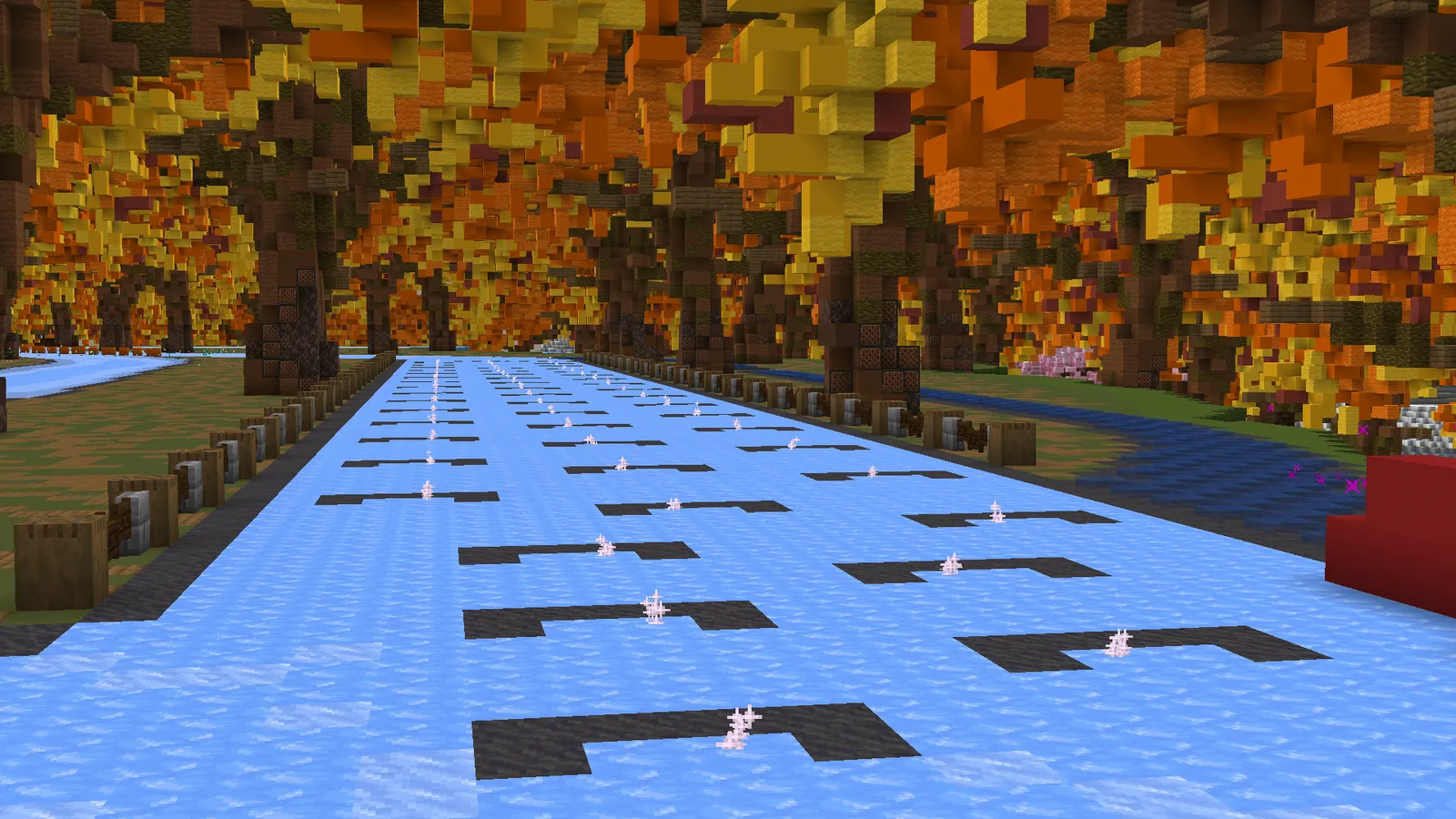
Grid
/te location grid <index>
To allow a track to be raced in the Grand Prix and other leagues, the minimum grid size should be 50 spots.
Qualification Grid (Outdated)
Rarely used now. Main leftover use case is old-school “start in the pits” qualification. Modern quali typically uses the normal spawn.
/te location qualygrid <index>
Track settings
Track Name
/te name <new Name>
Track Owner
/te owner <player>
💡 Tip: Since there isn't a way to make more people set up the track at the same time, giving a player temporary owner access is a solution.
Track Contributors
/te contributors <player> <player> <player>
Track Open/Close
Open tracks allow anyone to use them. Closed tracks are limited to staffers.
/te open
/te close
Time Trial
Default value: enable.
/te timetrial enable|disable
OpenBoatUtils
OpenBoatUtils is a mod that allows for customizing the boat physics. (Requires OpenBoatUtils mod)
A track can be assigned custom OpenBoatUtils settings. These can be standalone settings or groups, where a group is a collection of settings.
You can assign custom OpenBoatUtils settings/groups to a track using the following commands:
/te boatutils add setting|group <name>
To remove a setting|group from a track, use the following command:
/te boatutils remove <index>
The index can be found using the /t boatutils <track_name> command. (This can also be run on the main server.)
And to reset the settings:
/te boatutils reset
Groups
Pre-made groups of settings that can be added to a track in one go.
| Group | Setting | Value |
|---|---|---|
| air_stepping | fall_damage |
false |
air_control |
true | |
block_slipperiness |
air: 0.98 | |
step_height |
1.25 | |
water_elevation |
true | |
air_stepping |
true | |
| blue_speed | default_slipperiness |
0.989 |
| blue_speed_air | air_control |
true |
block_slipperiness |
air: 0.989 | |
| parkour | fall_damage |
false |
air_control |
true | |
default_slipperiness |
0.98 | |
jump_force |
0.36 | |
step_height |
0.5 | |
| rally | fall_damage |
false |
air_control |
true | |
default_slipperiness |
0.98 | |
step_height |
1.25 | |
| step_up | fall_damage |
false |
air_control |
true | |
block_slipperiness |
air: 0.98 | |
step_height |
1.25 | |
water_elevation |
true |
Settings
Individual settings that can be added to a track one at a time.
| Setting | Description | Value type |
|---|---|---|
acceleration_stacking |
Lets turn-based forward acceleration stack with forward/backward acceleration. | toggle |
air_control |
Boat moves in the air as if it were on the ground, using the slipperiness of minecraft:air. |
toggle |
air_stepping |
Allows the boat to step up when hitting a block's side while not touching the ground. | toggle |
backward_acceleration |
Boat's acceleration when moving backward (vanilla 0.005). |
number |
block_setting |
Sets a per-block setting for specific blocks, such as per-block jump force. | per-block setting |
block_slipperiness |
Sets the slipperiness value for one or more specific blocks. | block, number |
brake_slipperiness |
Scales the boat's velocity when pressing back instead of accelerating backward. | number |
collision_resolution |
Collision resolution level (1–50) to avoid wrong corner collisions at high speed. |
number |
collisionmode |
How the boat collides with other entities: vanilla, no boats or players, no entities, etc. | type of collision (listed on auto-complete) |
coyotetime |
Ticks where actions are still allowed after leaving the ground. | number |
default_slipperiness |
Slipperiness for blocks without a specific value (vanilla 0.6). |
number |
fall_damage |
Whether boats take fall damage and break after big falls. | toggle |
fix_double_water_elevation |
Enables the fix for the double water elevation behaviour. | toggle |
forward_acceleration |
Boat's acceleration when moving forward (vanilla 0.04). |
number |
gravity |
Strength of gravity applied to the boat (vanilla -0.04). |
number |
honey_compatibility |
Reverts honey behaviour on 1.21.3+ to 1.21.1, slowing the slide. | toggle |
jump_force |
Force applied when the boat jumps (0 = no jumping). |
number |
jumps |
Number of jumps available: 1 = single jump, 2 = double jump, etc. |
number|infinite |
lateral_slipperiness |
Extra grip opposing the current slip; 0 keeps the boat heading straight. |
number |
max_speed |
Threshold above which max speed resistance kicks in (negative disables it). | number |
max_speed_resistance |
Scales velocity above max speed; 1 makes going faster than max speed impossible. |
number |
multi_stepping |
Allows multiple step-ups per tick instead of vanilla's single step. | toggle |
scale |
Scale of the boat. | number |
step_height |
How high the boat can step up blocks without jumping (vanilla 0). |
number |
step_up_slipperiness |
Multiplies the boat's velocity whenever it steps up a block. | number |
surface_water_control |
Boat control while on the surface of water. | toggle |
swim_force |
Force applied when moving in water. | number |
turning_forward_acceleration |
Forward acceleration when turning without pressing forward or backward (vanilla 0.005). |
number |
underwater_control |
Boat control while fully underwater. | toggle |
walltap_multiplier |
Velocity multiplier when hitting a wall; 1 bounces back 100% of your velocity. |
number |
water_elevation |
Boat rises in water streams until it reaches the top. | toggle |
water_jumping |
Allows jumping while in water. | toggle |
yaw_acceleration |
Boat's angular (turning) acceleration (vanilla 1.0). |
number |